Download from Aparat
Paste an Aparat video link and save it.
By using this site you confirm you have the right to download the file you request.
How it works
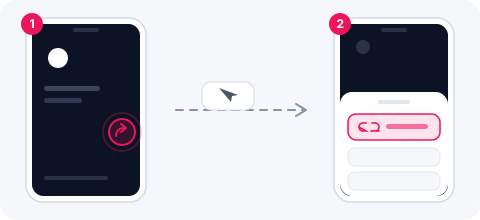
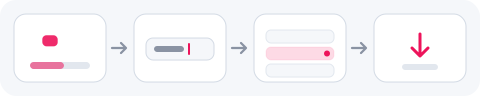
- 1
Copy the video address
aparat.com/v/ followed by the short hash.
- 2
Paste it and press Start
The full ladder, 144p to 1080p.
- 3
Save
MP4, or MP3 and WAV for the sound.
What you can get
An Aparat page builds itself in the browser: the HTML that arrives has no video address in it at all, which is why a plain reader finds nothing there. What the player uses is Aparat’s own open listing for the hash in the address, and that is where the file comes from here — with the full ladder, 144p to 1080p, rather than whichever single size a page happened to show.
Why a plain reader finds nothing on an Aparat page
The page arrives as 212 KB of HTML with not one video address in it — it is assembled in the browser afterwards. Anything that fetches the page and looks for a file comes away empty, which is why some downloaders simply fail on Aparat.
What the player itself uses is Aparat’s own open listing, keyed on the short hash in the address. That listing is where the file comes from here: the title, the length, the poster and every size, in one answer.
The whole ladder, not one size
Measured on a 3-minute 46-second music video: six rows, 144p through 1080p, and 2.8 MB for the smallest.
- 1080p and 720p for keeping
- 480p and 360p for sending
- 240p and 144p when the connection is the problem
Frequently asked questions
Which address do I paste?
The video page: aparat.com/v/ and the short hash. A channel page or a playlist has no single video to take.
Does it work for private videos?
No. Anything that needs a sign-in or a password cannot be read here.
Can I take just the sound?
Yes — MP3 at three bitrates, or WAV.