Play an M3U playlist in VLC
An M3U file is a playlist containing references to media files or streaming URLs. It does not contain the actual video or audio data. VLC reads one as it is — nothing to install, no plugin to add.
A file on your computer
Drag the .m3u or .m3u8 file onto the VLC window. That is the whole operation. Media → Open File does the same thing with three more clicks.
An address instead of a file
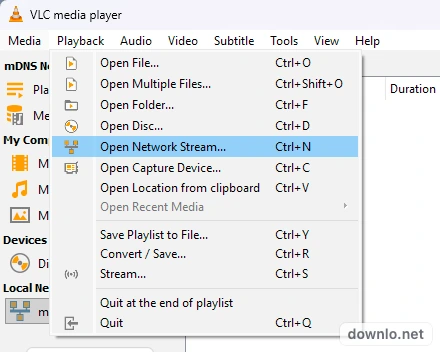
- In VLC, open Media → Open Network Stream, or press Ctrl + N.
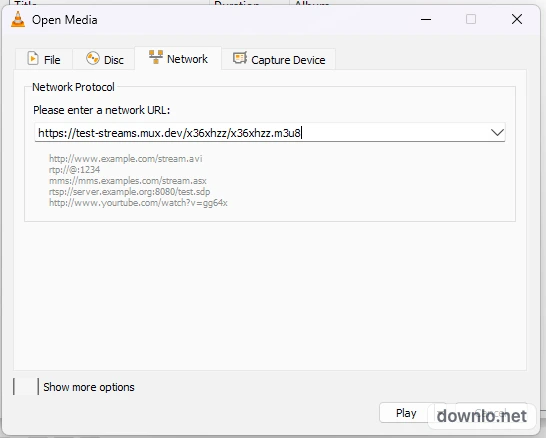
- Paste the playlist address into the field.
- Press Play.
Seeing what is inside it
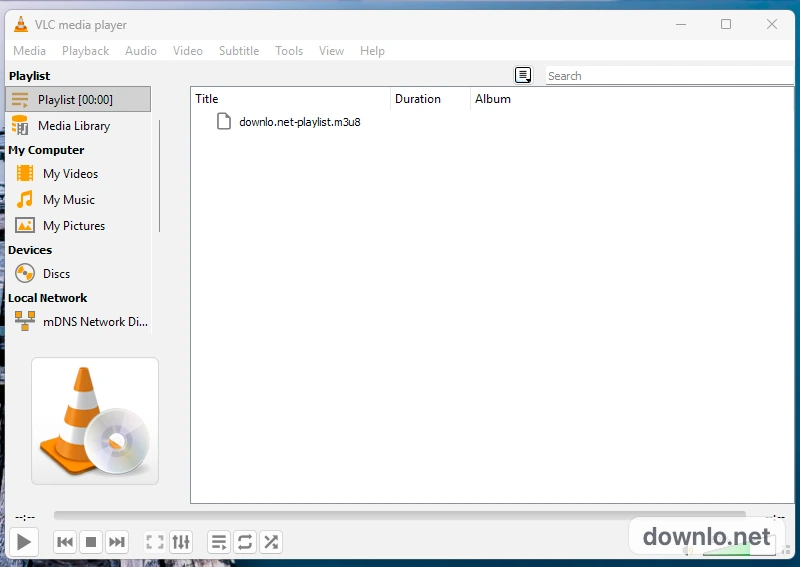
- Press Ctrl + L, or open View → Playlist.
- Read the entries the file carries — one line each.
- Double-click an entry to play it.
It opened, but nothing plays
Usually the file is not the problem. A playlist is a list of somewhere else, so it stops working the moment the somewhere else does — and VLC has no way to tell you which entry gave up.
- The addresses have expired. By far the commonest cause for a playlist of streams, and nothing in VLC revives them.
- The files have moved. A playlist of your own files points at paths; rename the folder and every line in it is wrong.
- The server wants a browser. Some addresses answer only a request carrying a referer or a particular user agent, which a player does not send.
- The stream is in a form VLC does not take, or it is encrypted.
- Your network is blocking it — another network settles that question in one try.
To tell a bad playlist apart from a bad install, open this public test stream the same way. If it plays, VLC is fine and the playlist is not:
https://test-streams.mux.dev/x36xhzz/x36xhzz.m3u8
Frequently asked questions
M3U or M3U8 — which one does VLC want?
Either. M3U8 is the same list written in UTF-8, which is what a list with non-English names needs. VLC opens both.
Does it need a plugin?
No. Playlist support is part of VLC.
Can VLC open a playlist that lives on the web?
Yes. That is what Open Network Stream is for: paste the address instead of opening a file.
Get VLC
3.0.24, 44.1 MB, from VideoLAN itself — with the published checksum printed beside it, so you can tell what you got is what they signed.
Get the latest version3.0.24 · 44.1 MB