H.264 vs H.265
One is smaller. The other opens. That is the whole decision, and it is less obvious than it sounds.
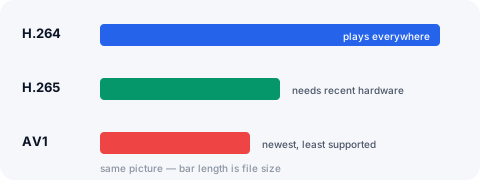
What they are
H.264, also called AVC, was finished in 2003 and became the format everything agreed on: every phone, every browser, every television, every editing program. If a device plays video at all, it plays H.264.
H.265, also called HEVC, arrived a decade later with the same picture at a substantially smaller size — commonly quoted as half the bits, and in practice somewhere between a quarter and a half less depending on the footage.
Why the better codec did not simply win
Patents. H.264 was licensed through a single pool on terms the industry could live with. H.265 ended up with several competing pools and claims from parties outside all of them, and nobody could tell you with confidence what shipping it would cost. Browsers largely declined to support it, which is why the web stayed on H.264 for years after a better option existed.
That stalemate is the direct reason AV1 exists: a group of large companies built a royalty-free codec rather than negotiate. AV1 is more efficient than H.265 and is what Facebook and Instagram now serve.
What plays what
H.264 plays on effectively everything, including phones that are a decade old. H.265 needs hardware support: Apple devices have had it since 2017, recent Android flagships have it, and desktop browser support is patchy and depends on the operating system.
The practical result is that an H.265 file can play perfectly on the machine that made it and refuse on the phone you wanted to watch it on — which is exactly the failure that makes a download feel broken.
Why your download is usually H.264
Some platforms now serve only modern codecs. Facebook was measured serving AV1 on every one of eight renditions of a reel; Instagram serves VP9 and AV1; TikTok and Twitch serve HEVC on some streams.
Handing those straight over would mean a file that does not open for most people. So the converter checks what it actually produced and re-encodes to H.264 only when it is not H.264 already. That costs a few seconds of processing per minute of video and roughly doubles the file, and it buys a download that opens on anything. A source that was already H.264 — which is most of them — is passed through untouched.
When to prefer H.265 anyway
If the file stays on Apple devices, or on hardware you control and have tested, H.265 is the better engineering answer: same picture, far less storage, and that matters for long recordings.
If the file is going to be sent to someone, posted, or watched on a device you have not seen, H.264 is the one that will not generate a message saying it does not work.