What is audio bitrate?
It is how much data each second of sound is allowed to use. Everything people argue about follows from that one sentence.
The number, literally
Bitrate is bits per second. A 128 kbps MP3 spends 128,000 bits — 16 kilobytes — on every second of audio, so a four-minute song lands near 3.8 MB. At 320 kbps the same song is about 9.6 MB. The music did not change; the budget did.
More budget means the encoder throws away less. Compression works by discarding the parts of a recording your ears are least likely to miss, and a bigger budget means less has to go.
Where a higher number stops helping
An encoder cannot add detail that was never in what it was given. If the source is a 128 kbps AAC track — which is what most video platforms serve — the ceiling was set upstream, and no MP3 setting recovers what was discarded there.
What a higher setting does buy is the move between codecs. MP3 is less efficient than AAC or Opus, so it needs a larger number to carry the same sound across; past that point the file grows and nothing else does.
Codecs are not equal at the same number
A 128 kbps AAC file sounds roughly like a 192 kbps MP3, because AAC is the newer, more efficient design. Opus, which YouTube uses for its better audio, is more efficient still. Comparing bitrates across formats tells you much less than comparing them within one.
So "YouTube only gives you 128" is misleading. The 128 in question is Opus or AAC, and it is a better 128 than MP3 ever managed.
Picking one
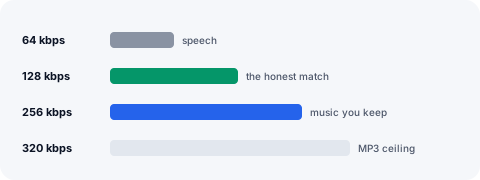
For speech — podcasts, lectures, interviews — 128 is plenty and the files stay small enough to keep dozens of hours on a phone. 64 to 96 is still perfectly intelligible for voice if space is tight.
For music you intend to keep, 256 is the practical middle: most listeners cannot separate it from anything higher on ordinary headphones, and it is enough to carry a platform’s AAC or Opus audio across into MP3. 320 is MP3’s ceiling.
And if you are going to edit the audio rather than listen to it, skip MP3 entirely. Every re-encode of a compressed file loses a little more, so WAV is the right answer for editing, at roughly 10 MB per minute.
CBR, VBR and why the number sometimes moves
Constant bitrate spends the same budget on silence as on a crowded chorus. Variable bitrate moves the budget where it is needed, which usually means a smaller file at the same perceived quality — and a "bitrate" that is really an average.
If a player reports a figure that does not match what you chose, a variable-bitrate file is usually the reason, not a fault.